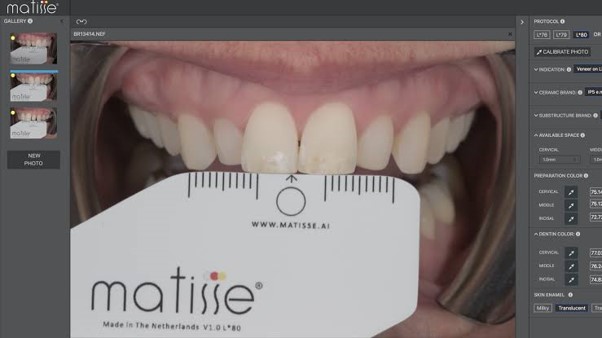
Matisse is an advanced shade-matching technology designed to improve the accuracy and consistency of ceramic shade communication between the clinic and laboratory.
By using calibrated colour data, Matisse helps translate clinical shade information into precise, custom ceramic recipes. This allows MV Dental Laboratory to better assess important tooth characteristics, including:
- Hue: The basic colour family of the tooth.
- Chroma: The strength or saturation of the colour.
- Value: The lightness or darkness of the tooth.
- Luminosity: The way light is reflected and balanced in the image.
- Translucency: The degree to which light passes through the tooth structure.
The Matisse Shade Matching Protocol: Two Capture Options
For the best results, MV Dental Laboratory recommends one of the following Matisse shade capture workflows.
Option 1: OptiShade by StyleItaliano - Gold Standard
OptiShade is the recommended option for the most reliable Matisse results. It provides a consistent digital shade capture workflow and is ideal for practices that regularly complete aesthetic restorative cases.
Practices can purchase OptiShade through StyleItaliano and use it to capture the required shade information before submitting the case to MV Dental Laboratory.
Option 2: Grey Card Photography
Where OptiShade is not available, Matisse can also be used with calibrated clinical photography. This involves photographing the target tooth and the selected shade tab on the same plane, with a neutral grey reference card visible in the background.
The grey card allows the software to calibrate white balance and luminosity, helping Matisse generate a more accurate ceramic recipe from the submitted image.
Clinical Photography Guide
To support accurate shade matching with the grey card workflow, follow the steps below:
- Prepare before dehydration: Capture the shade before tooth preparation where possible, as dehydration can alter the perceived tooth colour.
- Position the shade tab correctly: Place the pre-selected shade tab on the same focal plane as the target tooth. This helps ensure both the tooth and shade tab are assessed under the same conditions.
- Include the grey reference card: Place a neutral grey card in the background of the photograph so it is clearly visible and evenly lit.
- Use consistent lighting: Use a constant, colour-corrected light source for uniform illumination. Avoid mixed lighting conditions that may distort the shade.
- Use suitable camera settings: A DSLR camera is preferred, although a high-quality smartphone may be suitable where required. For DSLR photography, use manual mode with standard dental photography settings such as shutter speed 1/125, aperture f/22, and ISO 100-200. Switch off E-TTL flash.
- Submit clear images with the case: Ensure the target tooth, shade tab, and grey card are all sharp, visible, and free from glare or shadowing before sending the case to MV Dental Laboratory.
MV Dental Laboratory Support
MV Dental Laboratory has purchased OptiShade and can assist with professional shade capture for suitable cases.
For local patients, MV Dental Laboratory can attend to capture OptiShade data for a fee. Alternatively, patients can be referred to our facility for professional photos and shade information to be taken.
For more information, view the Matisse OptiShade tutorial or visit the Matisse OptiShade page.